

 |
 |
 |
 |
 |
 |
 |
 |
 |
 |
 |
 |
 |
 |
 |
 |
 |
 |




 |
|
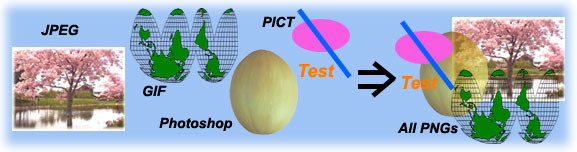
Image transcoding is a technique that changes images from one format to another. In AudioGraph recorder, user can import any format of pictures they like. But when exporting web based AudioGraph multimedia presentation, all formats of images including vector graphics and texts will be translated into PNG format. PNG is a kind of image format that supports both colour palette based codec and 32 bits pixel true colour codec. It also supports multiple transparencies and semi-transparencies. There are also some similar functions to transcode images into PNG format by Apple QuickTime. But it can not support transparency in colour palette based PNG format and can not support sem-itransparency in 32 bits pixel true colour PNG format. So I had to write my own code. To reduce the file size of the web based AudioGraph multimedia presentation, optimisation is added in the image transcoding part in AudioGraph. If the number of colours used in a image is less than 256, 16, 8, 4, then the image will be transcoded into PNG image with 256, 16, 8, 4 colour palette based format respectively. For all images including vector graphics and texts, their transparency colours or semi-transparency colours will be kept in their new PNG images. |

|
A very important feature of AudioGraph recorder is to edit text. Because AudioGraph is multimedia presentation editor, in most of time the text will be typed on some images. So to create a multilingual text editor to enable typing texts or sentences over one or more images is what I had to accomplish. |


|
|
|
|
|
|
|
|
|
Designed by Yong Qiu Liu.
Copyright © 2006 All rights reserved